Table of Contents
- 1 What Exactly is Voters.eci.gov.in?
- 2 Who Can Register Through This Portal?
- 3 The Different Forms: Understanding What You Need
- 4 Step-by-Step: Registering as a New Voter
- 5 What Happens After Submission?
- 6 The Reality Check: Common Issues and Solutions
- 7 The Mobile App Alternative: Voter Helpline
- 8 Downloading Your e-EPIC: The Digital Voter ID
- 9 Making Corrections: Because Mistakes Happen
- 10 For NRIs: The Special Form 6A Process
- 11 The Bigger Picture: Why This Portal Matters
- 12 Tips for a Smooth Experience
- 13 When Things Go Wrong: Complaint Mechanism
- 14 My Final Thoughts on the Portal
Voters.eci.gov.in Voter Regitration:Last week, my younger cousin turned 18. She was all excited about registering as a voter—ready to exercise her democratic right for the first time. But when she asked me how to do it, I realized something: despite being a registered voter myself for years, I’d never actually gone through the online process. We ended up spending an entire evening navigating the voters.eci.gov.in portal together, and honestly? It was both easier and more complicated than I expected.
Let me save you the confusion and walk you through everything you need to know about this portal. Whether you’re a first-time voter, someone who’s shifted cities, or just trying to correct details on your voter ID, this guide is for you.
What Exactly is Voters.eci.gov.in?
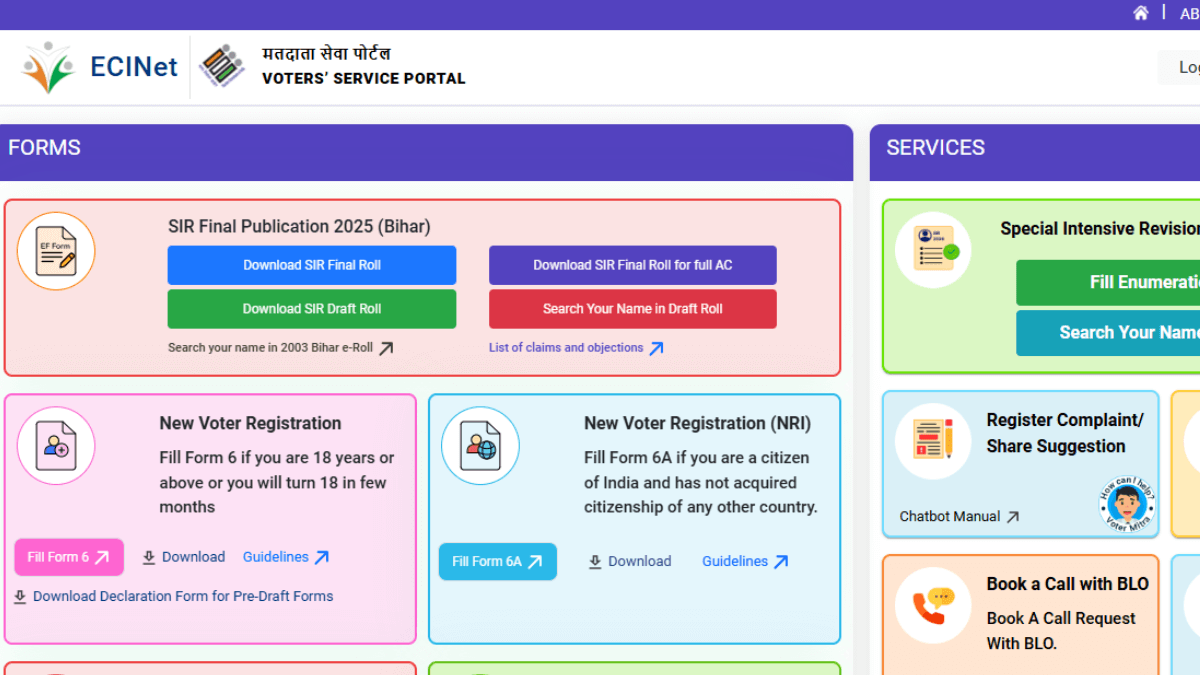
The Voters’ Services Portal at voters.eci.gov.in is the Election Commission of India’s official online platform for all voter-related services. Think of it as your one-stop digital solution for everything from registering as a new voter to downloading your e-EPIC (electronic voter ID card).
What impressed me about this portal is that it’s genuinely trying to make voter registration accessible. You don’t need to physically visit government offices, stand in long queues, or deal with endless paperwork anymore. Everything can be done from your phone or laptop, though I’ll be honest—the process requires patience and the right documents.
The portal has been designed to handle multiple services under one roof, which is quite ambitious for a government website. Sometimes it works brilliantly, and sometimes… well, let’s just say you’ll appreciate having a stable internet connection and some extra time on your hands.
Who Can Register Through This Portal?
Before we dive into the how-to, let’s talk about eligibility. You can register as a voter through voters.eci.gov.in if you meet these criteria:
You must be an Indian citizen—this is non-negotiable. You need to be at least 18 years old on the qualifying date. What’s a qualifying date? It’s typically January 1st of the year you’re applying. So if you turn 18 on December 31, 2025, you can apply now because you’ll be 18 on January 1, 2026.
You must be ordinarily residing in the constituency where you want to register. This basically means it’s your regular place of residence—where you actually live, not just visit occasionally.
If you meet these criteria, congratulations! You’re eligible to participate in the world’s largest democracy. And trust me, that first time you vote? It’s a feeling unlike any other. My cousin keeps her inked finger selfie from her first election as her phone wallpaper. The pride is real.
The Different Forms: Understanding What You Need
This is where things get a bit bureaucratic, but bear with me. The Election Commission uses different forms for different purposes. Here’s the breakdown:
Form 6 is for new voter registration. This is what first-time voters need to fill. It’s also used if you’ve moved to a different constituency and need to register there. My cousin filled this form, and it’s the most commonly used one.
Form 6A is specifically for overseas voters—Indian citizens living abroad who want to vote. If you’re an NRI wanting to exercise your franchise, this is your form.
Form 7 is for deletion or objection. Maybe you found duplicate entries, or someone who’s passed away is still on the voter list. This form handles those situations.
Form 8 is the jack-of-all-trades for corrections. Name spelled wrong? Wrong date of birth? Incorrect address? Photo needs updating? Form 8 is what you need. It’s also used if you’ve shifted within the same constituency.
Form 8A is for transposition—when you move from one polling station to another within the same assembly constituency.
Understanding which form you need saves enormous time. I’ve seen people fill the wrong form and then wonder why their application got rejected or delayed.
Step-by-Step: Registering as a New Voter
Let me walk you through the actual registration process, just like I did with my cousin. This is for Form 6—new voter registration.
Step 1: Visit the Portal
Head to voters.eci.gov.in. You can also download the Voter Helpline app from Google Play Store or Apple App Store. We used the website because it’s easier to see everything on a bigger screen, but the app works just as well.
Step 2: Create an Account
Click on ‘Sign Up’ and enter your mobile number, create a password, and complete the registration. You’ll receive an OTP to verify your number. Keep this login information safe—you’ll need it to track your application status later.
Step 3: Log In and Navigate to Form 6
After logging in, look for the ‘Forms’ section. Click on ‘Fill Form 6’. This is where the actual registration begins.
Step 4: Fill in Your Details
The form will ask for several categories of information. Take your time and be accurate:
Your personal details including your full name as per your documents. Your relative’s information—typically your father’s or mother’s name. Your residential address with PIN code—this determines your constituency. Contact details including mobile number and email. Your date of birth with supporting document details. Aadhaar number if you have one (it’s optional but speeds up the process). A recent photograph—make sure it meets the specifications.
Here’s a pro tip my cousin learned the hard way: Enter everything EXACTLY as it appears in your supporting documents. Even small variations can cause verification issues later.
Step 5: Upload Documents
This is crucial. You need to upload clear, legible copies of documents proving your age and address. The portal accepts various documents:
For age proof, accepted documents include your birth certificate, school leaving certificate, PAN card, passport, driving license, or similar government-issued documents.
For address proof, you can use utility bills, bank passbooks, passport, rental agreements, ration cards, or Aadhaar cards.
The photograph needs to be a recent passport-size image with a plain background. Make sure it’s clear and your face is properly visible.
My cousin initially uploaded blurry scans, and the system kept rejecting them. We had to rescan everything with proper lighting and clear focus. Save yourself that frustration—get it right the first time.
Step 6: Review and Submit
Before hitting submit, double-check everything. Once submitted, you can’t easily change most details. The system will generate an acknowledgment number—screenshot this or write it down. You’ll need it to track your application.
What Happens After Submission?
Once you submit your application, the real waiting game begins. Here’s what happens behind the scenes:
Your application goes to the Electoral Registration Officer (ERO) or Assistant ERO of your constituency. They review your application and documents for completeness and accuracy.
Then comes field verification. A Booth Level Officer (BLO) will visit your address to verify that you actually live there. This is why it’s crucial to provide an accurate address where someone can confirm you reside.
If everything checks out, your name gets added to the electoral roll. You’ll receive your EPIC (Electoral Photo Identity Card) at your registered address. The entire process can take anywhere from a few weeks to a couple of months, depending on your state and how efficiently things move.
You can track your application status using that acknowledgment number. Log into the portal, go to ‘Track Application Status’, enter your reference number, and you’ll see where your application stands.
The Reality Check: Common Issues and Solutions
Let me be brutally honest about what you might face, based on my cousin’s experience and countless stories I’ve heard:
Document Upload Failures: This is the most common frustration. The portal can be finicky about file sizes, formats, and quality. Solution? Use JPEG format, keep files under 2MB, ensure good lighting and clarity, and have patience. Sometimes you need to try multiple times.
Server Errors: Peak hours can overwhelm the system. We encountered “Server Error, Please Re-try Later” messages multiple times. Solution? Try during off-peak hours—early morning or late evening works best.
Verification Delays: Field verification can take time. If the BLO doesn’t find anyone at your address, it causes delays. Solution? Ensure someone is home during typical visiting hours, or provide an additional contact number.
Form Confusion: People often fill the wrong form. Solution? Read carefully which form applies to your situation before starting.
Photo Rejections: The system is strict about photo specifications. Solution? Use a recent, clear photo against a plain light background. No selfies, no group photos, no sunglasses.
The Mobile App Alternative: Voter Helpline
While we used the website, the Voter Helpline app offers the same services in a more mobile-friendly interface. You can find voter information, register as a new voter, download your e-EPIC, track applications, and even lodge complaints.
However, the app has its own set of challenges. User reviews on app stores mention issues with document verification, server errors, and slow performance. My advice? Try both and see which works better for you. Some people find the app more convenient, while others prefer the website’s larger screen real estate.
Downloading Your e-EPIC: The Digital Voter ID
Once you’re registered, you can download your e-EPIC—a digital version of your voter ID card that’s legally valid for identification purposes. Here’s how:
Log into voters.eci.gov.in using your credentials. Navigate to the ‘e-EPIC Download’ section. Enter your EPIC number (voter ID number) or Form Reference Number. Select your state and click ‘Search’. The system will display your details. Click ‘Send OTP’ for verification. Enter the OTP received on your registered mobile number. Click ‘Download e-EPIC’.
The downloaded PDF contains your complete voter information and photo, digitally signed by election authorities. Save it on your phone—it’s accepted as valid ID proof for voting and many other purposes.
My cousin downloaded hers immediately after registration was approved, and she carries it everywhere on her phone. No need to worry about losing a physical card or carrying it around.
Making Corrections: Because Mistakes Happen
Noticed an error in your voter details? Form 8 is your friend. The process is similar to new registration:
Log in to the portal. Select ‘Form 8’ under Forms. Choose what you want to correct—name, photo, address, date of birth, etc. Provide the correct information and supporting documents. Submit and track your application.
I had to use Form 8 myself last year when I realized my date of birth was entered incorrectly. The process took about three weeks, but it got corrected without any hassle.
For NRIs: The Special Form 6A Process
If you’re an Indian citizen living abroad, you can still register to vote through Form 6A. The process is slightly different:
You need to provide your passport details including the page with your photo and visa endorsement. Your address in India (from your passport) will be verified by a BLO. You can fill Form 6A online at voters.eci.gov.in or obtain physical copies from Indian Missions abroad.
Important note: If you’re already registered as a general voter in India, you must surrender your existing EPIC when applying as an overseas voter. You can’t be registered as both.
The Bigger Picture: Why This Portal Matters
Taking a step back, voters.eci.gov.in represents something significant—India’s attempt to digitize democratic participation. In a country of over a billion people, making voter registration accessible online is no small feat.
Yes, the portal has its frustrations. Yes, the process could be smoother. But consider the alternative: physically visiting government offices, potentially taking time off work, dealing with paperwork, and following up endlessly.
The digital portal, for all its flaws, brings the process to your fingertips. You can register from your home at midnight if you want. You can track your application without making phone calls. You can download your voter ID without waiting for physical delivery.
As someone who’s seen India’s digital governance evolution over the years, I’m cautiously optimistic. Every major digital initiative starts with growing pains. The fact that the Election Commission is continuously updating and improving this portal shows commitment to making democracy more accessible.
Tips for a Smooth Experience
Based on our collective experiences, here are some practical tips:
Start early. Don’t wait until election announcements. Register well in advance to avoid last-minute rush and delays.
Get your documents ready first. Have clear scans or photos of all required documents before you start filling forms. This saves frustration mid-process.
Use a stable internet connection. A dropping connection can cause form submission failures. Wi-Fi usually works better than mobile data.
Save progress frequently. Though the portal has auto-save features, manually saving your progress never hurts.
Keep that acknowledgment number safe. Screenshot it, email it to yourself, write it down—whatever works. You’ll need it for tracking.
Be patient with field verification. This is the one step that requires physical presence. Make sure your address is accurate and accessible.
Check your details on the electoral roll. After registration is approved, search for your name on electoralsearch.eci.gov.in to verify everything is correct.
Download and save your e-EPIC. Don’t wait until you need it urgently. Download it as soon as it’s available.
When Things Go Wrong: Complaint Mechanism
If you face genuine issues—application stuck for months, BLO never visited, incorrect rejection—you can file complaints through the portal itself. There’s a dedicated complaints section where you can describe your issue and track its resolution.
You can also call the national voter helpline at 1950. It’s toll-free and meant to assist with voter registration queries and issues.
My Final Thoughts on the Portal
After spending that evening helping my cousin register, and then writing this entire guide, I’ve come to appreciate both the ambition and the execution of voters.eci.gov.in.
Is it perfect? Absolutely not. The server issues are annoying. The document upload process could be more forgiving. The interface could be more intuitive.
But here’s what it gets right: accessibility, comprehensiveness, transparency in tracking, digital ID download, and continuous availability.
Most importantly, it’s democratizing democracy itself. My cousin, a first-time voter, registered entirely from her smartphone without visiting a single government office. That’s progress worth acknowledging.
Yes, you’ll probably encounter some frustration. Yes, you might need to retry a few times. But at the end of the process, you’ll have exercised one of your most fundamental rights as a citizen—the right to vote.
And watching my cousin’s excitement when her voter ID arrived? That made all the technical frustrations worthwhile. She’s not just a citizen now; she’s an active participant in shaping India’s future.
So go ahead, visit voters.eci.gov.in, create your account, and register. The process might test your patience, but the outcome is worth it. Democracy isn’t just about voting—it starts with registering to vote.
And trust me, that first time you cast your ballot, finger proudly displaying election ink, you’ll forget all about those server errors and document upload issues. Because you’ll be part of something much bigger than any website glitch.
Note: This article is based on personal experience and publicly available information as of December 2025. For the most current procedures and requirements, always refer to the official Election Commission of India website at eci.gov.in or call the national voter helpline at 1950.